Full-stack · Product · AI
Ramble
Ramble is a free-form journaling web app that reads back over your entries and tells you how you've actually been feeling.
Next.js · Supabase · Claude API · Claude Code
TL;DR: Ramble is a free-form journaling app I designed and built solo as a student project, using Next.js, Supabase and the Claude API. You write freely, and on demand, AI summarizes how you felt across a month of entries, giving you a starting point to reflect on your own. It taught me to take a product from problem to working MVP and gave me my first real experience with system design. It works, but it hasn't shipped yet; next up are user testing and personalized journaling prompts.
Overview
Ramble is a free-form journaling web app that reads back over your entries and tells you how you've actually been feeling. You write casually, with no prompts and no pressure to edit. When you're ready, Ramble uses AI to turn a month of entries into an overview of your emotions. I built it as a student project to learn how a product goes from idea to working app: defining the problem, scoping an MVP, designing the system, and building it end to end.
- Role: Solo product owner, designer and developer
- Stack: Next.js, Supabase, Claude API (Anthropic)
- Timeline: About one month, built with Claude Code
- Status: Working MVP, not yet shipped
[Screenshots to come: journal editor, entry list, monthly mood overview]
The problem
Journaling is great at capturing thoughts and bad at showing you patterns over time. I've journaled my whole life, and I love sitting down to sort through my thoughts, emotions and the events of my day. But over the years I built up a stack of notebooks. The only way to see how I'd grown was to sift through them by hand, so I didn't. The bigger issue was that I'd write and then forget. I'd close the journal feeling better that day, but I couldn't answer a simple question: how have I been feeling these past few weeks? The reflection happened in each entry, but never across entries.
The gap: journaling tools are built for writing, not for looking back. Reading your own history is manual, slow, and easy to skip.
Target user
Ramble is for tech-savvy young adults who already journal, or want to, and are comfortable doing it online.
- Job to be done: "Help me understand how I've been feeling lately, without having to reread everything I wrote."
- What they value: low-effort writing, privacy, and insight that feels personal rather than generic.
- Who it's not for (yet): people looking for advice, coaching or therapy-style exercises. Ramble reflects; it doesn't prescribe.
The solution: write freely, reflect later
Ramble separates writing from reflecting. You write without friction, and the AI gives you a starting point for looking back. What you learn from it, and how you grow, is up to you.
- Write freely. Open the app and write the way you'd journal casually. There are no prompts, templates or word counts. The name says it all: ramble on without stopping to revise.
- Let entries build up. Once a few entries are in, there's enough to find a pattern.
- Analyze on demand. One button sends the month's entries to Claude, which runs sentiment analysis across them.
- Read your mood overview. Ramble returns a summary of how you've been feeling over the month, a cross-entry summary to reflect on, something a paper journal can't give you.
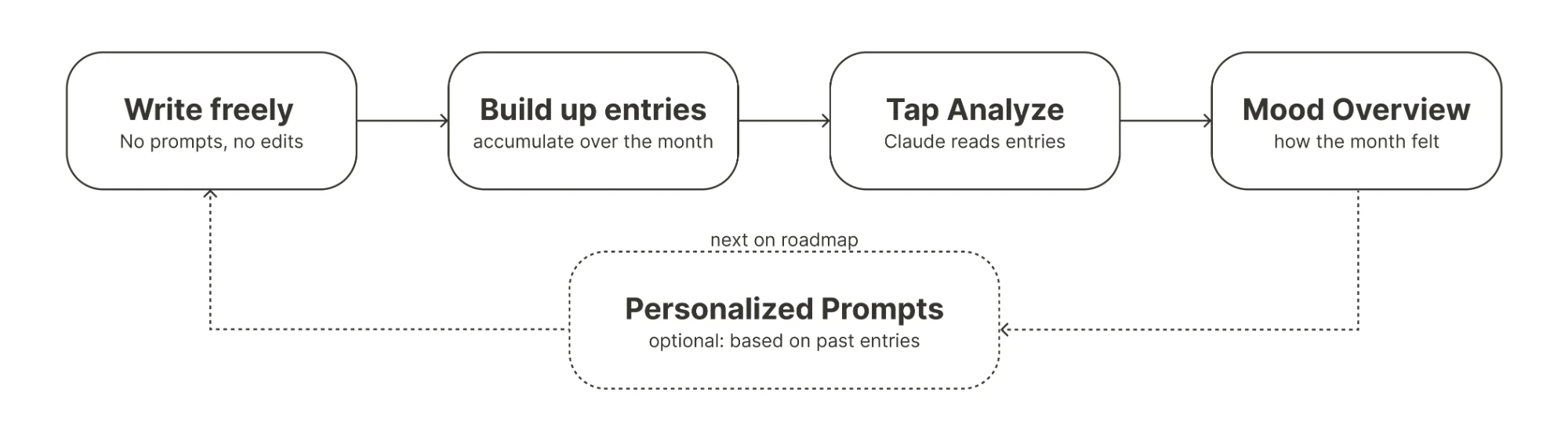
The dashed step is the next iteration: using what you've written to suggest prompts and exercises that help you go deeper, which closes the loop back into writing.
Key product decisions
Every decision came back to one principle: Ramble should feel like an honest, pen-and-paper journal, and reflection should stay in the user's hands.
| Decision | What I chose | What I gave up | Why |
|---|---|---|---|
| Writing format | Free-form: no prompts, no minimum length | Guidance for users who stare at a blank page | Rambling is the point. Structure adds effort, and effort kills a journaling habit. |
| Editor | Bare-bones, no formatting tools | Highlights, bold and italics, font options, images | I wanted it to feel like writing in a notebook: honest and unpolished. Formatting can come later without breaking that feel. |
| When AI runs | On demand, via one Analyze button | Automatic, always-on insights | Users choose which months to analyze and which to leave alone. Constant analysis could also start shaping what people write, and I didn't want that. |
| Engagement mechanics | No streaks, reminders or gamification | An easy lever for retention | Streaks turn journaling into a chore to protect. When retention becomes the priority, simple reminders or an optional streak are the first options I'd test. |
| Time window | A month of entries | Per-entry feedback | Single entries are noisy. Patterns only show up across weeks. |
| Output | A mood overview, not advice | Advice or coaching | Ramble's job is to lead solo reflection, guiding users to their own conclusions. Even future writing prompts act as invitations for further reflection rather than advice. |
| MVP scope | The core write-then-reflect loop only | Personalized prompts, formatting, reminders | I validated the core value first. Prompts depend on the analysis being reliable, so they come next. |
Building it
Owning every stage myself was the point of the project: it forced me to learn how product, design and engineering decisions depend on each other. The hardest part was planning the system as Ramble was my first real experience with system design.
Even a small app like Ramble has many ways to be built: how entries are stored, when and how they reach the AI, and how the results come back and get displayed. Each choice shaped the user experience, so I had to think through system design before building.
I built Ramble with Claude Code as a development partner. It was most valuable for:
- Weighing options mid-build. When a design choice came up, I could compare approaches and their tradeoffs before committing.
- Keeping the big picture in view. It helped me step back from individual features and check that the pieces still fit the product I was trying to build.
Stack: Next.js (front end), Supabase (database), Claude API (NLP analysis across entries).
What it would take to launch
Ramble works today as a personal tool: users sign in to their own account, and tapping Analyze sends that month's full entries to Claude, which returns a simple emotion read (for a positive set of entries, something like "happy"). Opening it to other people raises the bar, because journal entries are some of the most personal data someone can share. Before launch, I'd like to find answers for:
- Data minimization: Full entries go to the AI today. I'd look at whether less could be sent, and make it clear to users exactly what leaves the app, plus how to export or delete everything.
- Trust and transparency: Making it obvious that AI only reads entries when the user taps Analyze, never in the background.
- Sensitive content: A one-word label like "sad" is fine for a normal rough week, but not for an entry that reflects serious distress. The app would need safeguards and a gentle way to point people toward real support.
- Accuracy: Whether the mood overview actually matches how users felt.
Measuring success
North Star metric: monthly reflections, meaning users who write entries and read their mood overview in a given month. That's the full loop, and it's the main difference between Ramble and your notes app.
| Metric | What it tells me |
|---|---|
| Weekly retention (week 1, week 4) | Whether journaling in Ramble becomes a habit |
| Entries per user per week | Whether writing actually feels low-effort |
| Analysis rate (% of active users who tap Analyze) | Whether the AI feature is the reason people stay |
| Summary accuracy rating | Whether the reflection is trustworthy |
| Writing after reading (entries in the week after an overview) | Whether reflection pulls people back into writing, the loop personalized prompts are meant to strengthen |
What's next
- User testing. So far I'm Ramble's only user, and validating with real users is the stage of the product lifecycle I most want to practice next. Before adding features, I want a small group of journalers to use it for a month. Then I'd check whether the mood overview feels accurate and useful to someone other than me.
- More robust AI readings. Moving past a single emotion label toward richer summaries, such as how moods shift across the month.
- Personalized prompts and exercises. Using past entries to suggest optional writing prompts that help users dig deeper into what they've already written.
- Formatting tools. Highlights, bold, italics and underline, font size and weight, and possibly images, added without losing the notebook feel.
Reflection
Ramble started as a fix for my own habit: I was writing a lot and learning little from it. It became my hands-on course in building a product from start to finish. Building it taught me that the hardest product work happens before the code. That means deciding what the core loop is, what to leave out, and how each technical choice shapes the experience. It also showed me that an AI feature is only as good as the trust behind it. For a journaling app, that trust is the product.